Developer Guide
- Introduction
- Acknowledgements
- Setting up, getting started
- Design
- Implementation
- Documentation, logging, testing, configuration, dev-ops
- Appendix: Requirements
- Appendix: Instructions for manual testing
- Appendix: Effort
- Appendix: Planned enhancement
Introduction
Tutee Managing System (TMS) is a desktop application designed for private tutors managing students, optimized for use via a Command Line Interface (CLI) while still having the benefits of a Graphical User Interface (GUI). TMS utilizes your fast typing ability to execute your management tasks faster than traditional GUI apps.
This guide helps developers understand the design of the product and some significant features.
Acknowledgements
- Tutee Managing System (TMS) is adapted from the AddressBook-Level3 project created by the SE-EDU initative.
Setting up, getting started
Refer to the guide Setting up and getting started.
Design
 Tip: The
 .puml files used to create diagrams in this document can be found in the diagrams folder. Refer to the PlantUML Tutorial at se-edu/guides to learn how to create and edit diagrams.
Architecture
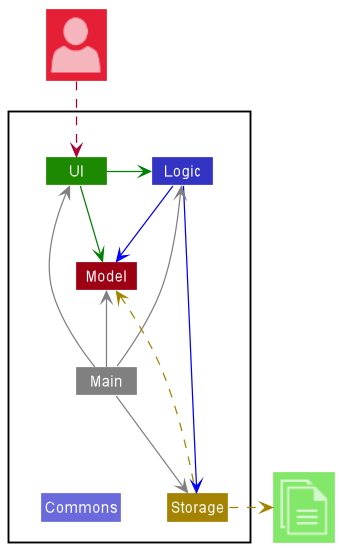
The Architecture Diagram given above explains the high-level design of the App.
Given below is a quick overview of main components and how they interact with each other.
Main components of the architecture
Main has two classes called Main and MainApp. It is responsible for,
- At app launch: Initializes the components in the correct sequence, and connects them up with each other.
- At shut down: Shuts down the components and invokes cleanup methods where necessary.
Commons represents a collection of classes used by multiple other components.
The rest of the App consists of four components.
-
UI: The UI of the App. -
Logic: The command executor. -
Model: Holds the data of the App in memory. -
Storage: Reads data from, and writes data to, the hard disk.
How the architecture components interact with each other
The Sequence Diagram below shows how the components interact with each other for the scenario where the user issues the command delete 1.
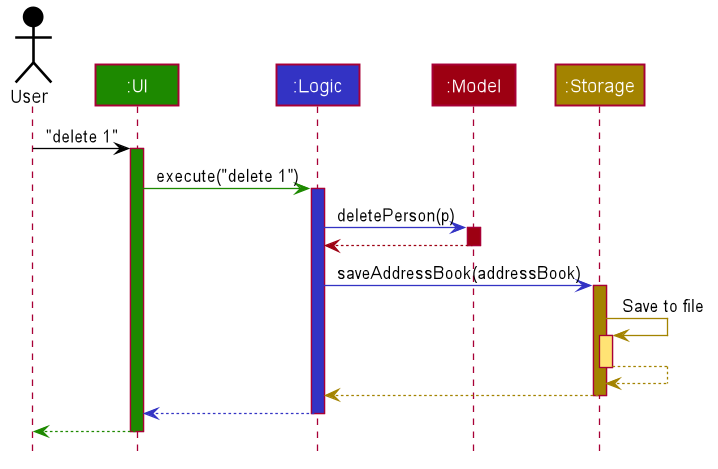
Each of the four main components (also shown in the diagram above),
- defines its API in an
interfacewith the same name as the Component. - implements its functionality using a concrete
{Component Name}Managerclass (which follows the corresponding APIinterfacementioned in the previous point.
For example, the Logic component defines its API in the Logic.java interface and implements its functionality using the LogicManager.java class which follows the Logic interface. Other components interact with a given component through its interface rather than the concrete class (reason: to prevent outside component’s being coupled to the implementation of a component), as illustrated in the (partial) class diagram below.
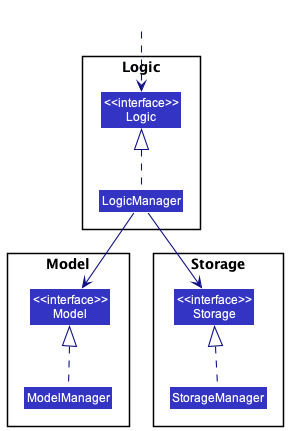
The sections below give more details of each component.
UI component
The API of this component is specified in Ui.java
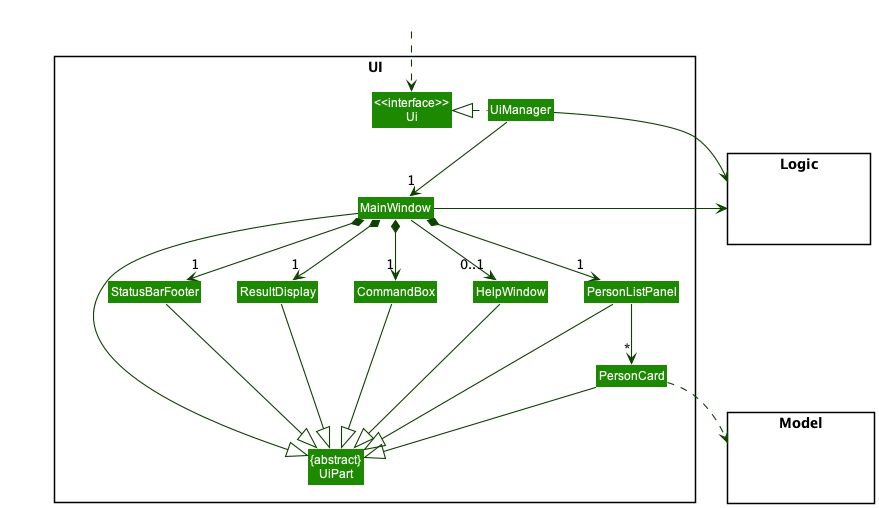
The UI consists of a MainWindow that is made up of parts e.g.CommandBox, ResultDisplay, PersonListPanel, StatusBarFooter etc. All these, including the MainWindow, inherit from the abstract UiPart class which captures the commonalities between classes that represent parts of the visible GUI.
The UI component uses the JavaFx UI framework. The layout of these UI parts are defined in matching .fxml files that are in the src/main/resources/view folder. For example, the layout of the MainWindow is specified in MainWindow.fxml
The UI component,
- executes user commands using the
Logiccomponent. - listens for changes to
Modeldata so that the UI can be updated with the modified data. - keeps a reference to the
Logiccomponent, because theUIrelies on theLogicto execute commands. - depends on some classes in the
Modelcomponent, as it displaysPersonobject residing in theModel.
Logic component
API : Logic.java
Here’s a (partial) class diagram of the Logic component:
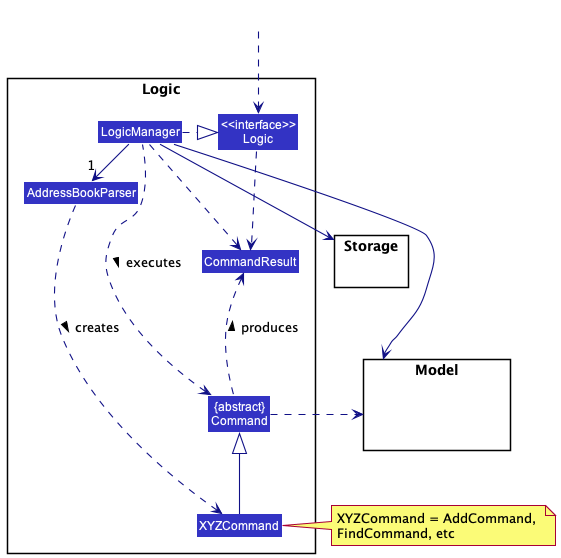
How the Logic component works:
- When
Logicis called upon to execute a command, it uses theAddressBookParserclass to parse the user command. - This results in a
Commandobject (more precisely, an object of one of its subclasses e.g.,AddCommand) which is executed by theLogicManager. - The command can communicate with the
Modelwhen it is executed (e.g. to add a tutee). - The result of the command execution is encapsulated as a
CommandResultobject which is returned back fromLogic.
The Sequence Diagram below illustrates the interactions within the Logic component for the execute("delete 1") API call.
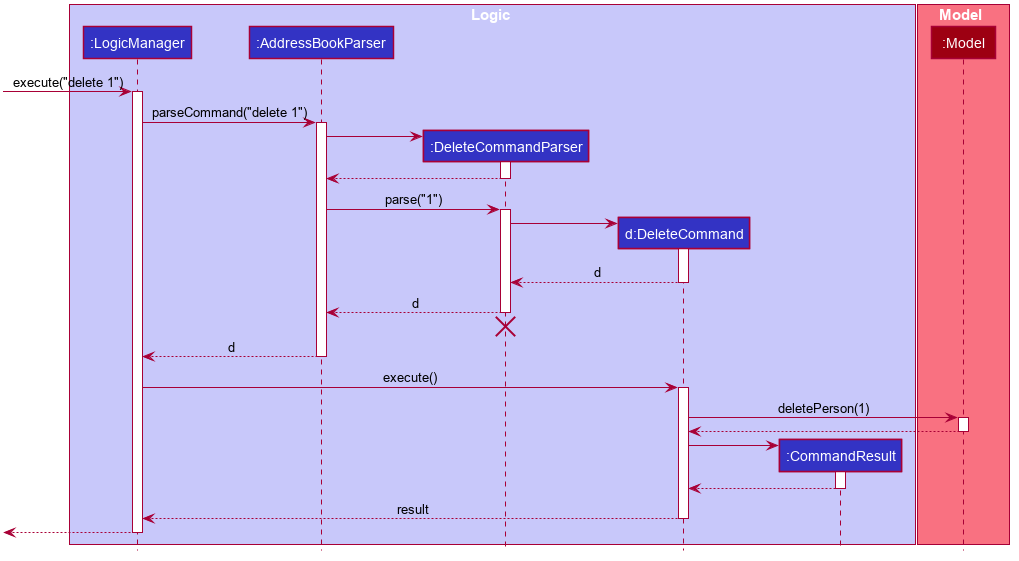
 Note: The lifeline for
 DeleteCommandParser should end at the destroy marker (X) but due to a limitation of PlantUML, the lifeline reaches the end of diagram.
Here are the other classes in Logic (omitted from the class diagram above) that are used for parsing a user command:
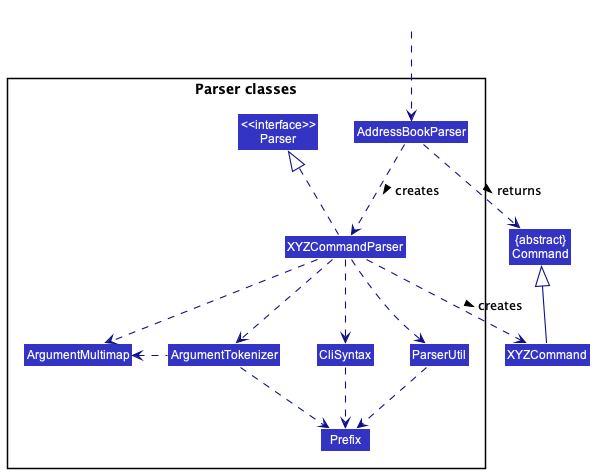
How the parsing works:
- When called upon to parse a user command, the
AddressBookParserclass creates anXYZCommandParser(XYZis a placeholder for the specific command name e.g.,AddCommandParser) which uses the other classes shown above to parse the user command and create aXYZCommandobject (e.g.,AddCommand) which theAddressBookParserreturns back as aCommandobject. - All
XYZCommandParserclasses (e.g.,AddCommandParser,DeleteCommandParser, …) inherit from theParserinterface so that they can be treated similarly where possible e.g, during testing.
Model component
API : Model.java
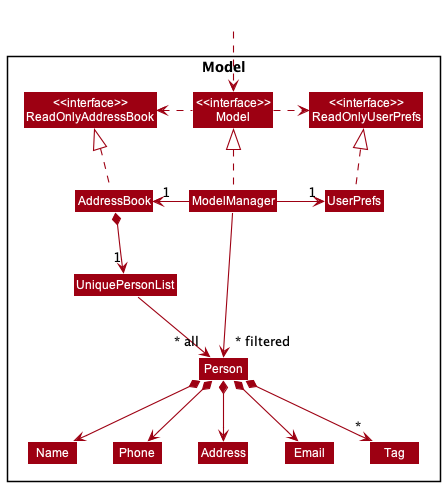
The Model component,
- stores the address book data i.e., all
Personobjects (which are contained in aUniquePersonListobject). - stores the currently ‘selected’
Personobjects (e.g., results of a search query) as a separate filtered list which is exposed to outsiders as an unmodifiableObservableList<Person>that can be ‘observed’ e.g. the UI can be bound to this list so that the UI automatically updates when the data in the list change. - stores a
UserPrefobject that represents the user’s preferences. This is exposed to the outside as aReadOnlyUserPrefobjects. - does not depend on any of the other three components (as the
Modelrepresents data entities of the domain, they should make sense on their own without depending on other components)
Note: An alternative (arguably, a more OOP) model is given below. It has a Tag list in the AddressBook, which Person references. This allows AddressBook to only require one Tag object per unique tag, instead of each Person needing their own Tag objects.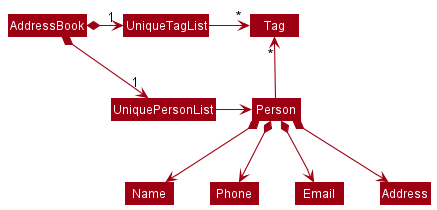
Storage component
API : Storage.java
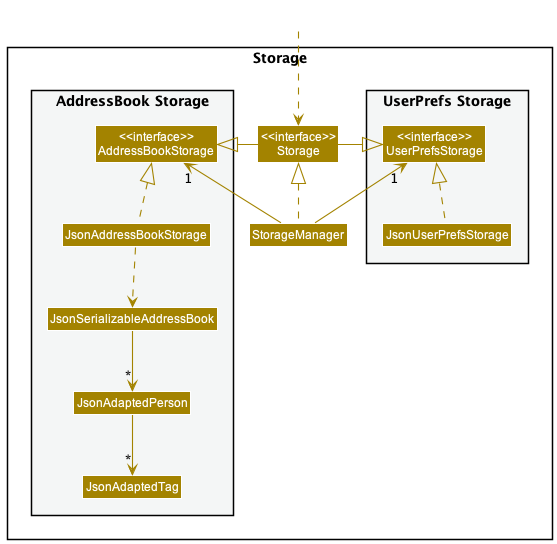
The Storage component,
- can save both address book data and user preference data in json format, and read them back into corresponding objects.
- inherits from both
AddressBookStorageandUserPrefStorage, which means it can be treated as either one (if only the functionality of only one is needed). - depends on some classes in the
Modelcomponent (because theStoragecomponent’s job is to save/retrieve objects that belong to theModel)
Lesson model
API : Lesson.java

- Each
Studenthas a list ofLessonwhich contains String representation of the name.
Common classes
Classes used by multiple components are in the seedu.addressbook.commons package.
Implementation
This section describes some noteworthy details on how certain features are implemented.
Field Validation
Each Tutee has various fields (i.e. name, phone…). Validation from user input is done at the Parser level, but
when loading from a JSON file field validation is performed differently.
The automatic validation of a tutee field requires the following three elements to be defined,
an example implementation of a tutee field is shown below:
public class Phone {
   // Need at least one constructor with this signature
   public Phone(String value) {
      // ...
   }

   // Message to display to the user if the stored JSON data is invalid for the given field
   public static final String MESSAGE_CONSTRAINT = "Invalid phone number!";

   // Validation method that will return true if the value is valid for the field, false otherwise
   // If your field is named differently this method is named differently too, e.g. isValidRemark
   public static boolean isValidPhone(String value) {
      // ... details
   }
}
This automatic validation relies on Java reflection and will raise RuntimeExceptions if the automatic validation fails
for reasons other than the user input being invalid. The process is as follows:
- The JSON file is read
- The
isValidmethod is called with the given input - If
isValidreturns false, theMESSAGE_CONSTRAINTis displayed to the user - Otherwise, the input is passed to the constructor to create an instance of the field
Attendance Management
The Attendance Field
The Attendance field uses a hashset internally to store all the dates on which the tutee was present. The field is designed to be
immutable, which means updating a tutee’s absence or presence will create a new attendance field instance.
Mark and Unmark Command
The mark and unmark commands are implemented similarly: both follow the format of mark|unmark INDEX [DATES...]. The
user’s input is parsed by its respective parser (MarkCommandParser and UnmarkCommandParser) and then those arguments
are passed to the command.
If the user does not specify a date, then the command will use the default value as returned by LocalDate.now().
If the command executes successfully, the specified tutee’s attendance field will be updated accordingly. mark will add the given
dates to the attendance field, thereby marking them as present. Unmark will remove them, thereby marking them as absent.
If tutee has already been marked present or absent on the specified date, the corresponding command will have no effect.
Query Command
The date is represented as an Optional<LocalDate>. When the command is executed, if this optional is empty, then the command will return all the dates in which the tutee was present. Otherwise, the command will return whether the tutee was present by calling the
didAttend() method on the attendance field.
Learn\Unlearn feature
The learn\unlearn mechanism is storing the lessons in a Set, adding\removing a lesson is editing this Set. It implements the following classes and operations:
-
Lesson— Representing lesson fields, containting aSetof lessons . -
Lesson#learn()— Adds the new lesson to the Set. -
Lesson#unlearn()— Removes a lesson from the Set. -
LearnCommand— Adds new lesson to the Index specified Tutee. -
UnlearnCommand— Removes lesson from the Index specified Tutee.
Design considerations:
Aspect: How learn & unlearn executes:
-
Alternative 1 (current choice): add/remove lesson to the
Set.- Pros: Easy to implement, don’t allow duplicates.
- Cons: Does not show the learning order.
-
Alternative 2: Combine Attendance and Learning.
- Pros: Easier for user to keep track of time and lesson.
- Cons: Harder to implement.
{more aspects and alternatives to be added}
Filter feature
Filter Implementation
The logic of the filter implementation is found in FilterCommand class. The constructor of FilterCommand takes in
a FilterTuteeDescription object and creates a FieldContainsKeywordPredicate based on the variables that are set in
FilterTuteeDescription.
FilterTuteeDescription encapsulates the fields of a tutee that the user wants to filter.
The class contains all the fields of a tutee including: name, phone, email, address, subject, schedule, start time, end time, tagof a tutee.
By default, name, address, tags are empty lists while the rest of the fields are empty strings.
FilterCommandParser will set the appropriate fields in FilterTuteeDescription for the
fields that are to be filtered in. Once FilterTuteeDescription has its fields set (e.g. nameToFilter = “alex”),
FieldContainsKeywordPredicate will take in all the variables in FilterTuteeDescription and return a FieldContainsKeywordPredicate object.
FieldContainsKeywordPredicate implements Predicate and it overrides the test method. It returns true if the
given field is empty (default) or when the tutee has the field equal to the field provided by the user when using the filter
command.
Finally, FilterCommand will execute which will call the method model.updateFilteredTuteeList(predicate) using the
FieldContainsKeywordPredicate object as the predicate. The feature will filter and display the tutees which have fields
that are equal to what the user has provided.
Design considerations
How filter executes
- Alternative 1 (current choice): Use prefix to filter what to search for.
- Pros: More precise when filtering time (e.g.
filter st/10:30will only return tutees whose lesson starting time is at 10:30) - Cons: Harder to implement.
- Pros: More precise when filtering time (e.g.
- Alternative 2: Extend find feature and filter any field without specifying prefix.
- Pros: Easier to implement.
- Cons: Could cause confusion when filtering time (e.g.
filter 10:30will return all tutees whose lesson start time and end time are at 10:30)
Copy feature
Copy Implementation
The copy feature is facilitated by CopyCommand. It extends Command. The constructor of CopyCommand takes in
an index and an EditPersonDescripter object and creates a tutee based on the variables that are set in
EditPersonDescripter. The CopyCommand class makes use of the EditPersonDescripterin the EditCommand class which contains all the fields of a tutee including:
subject, schedule, start time, end time of a tutee.
All of the fields are required to be filled in order for the command to make a copy of a tutee with a different lesson and schedule.
Documentation, logging, testing, configuration, dev-ops
Appendix: Requirements
Product scope
Target user profile:
- has a need to manage a significant number of tutees
- prefer desktop apps over other types
- can type fast
- prefers typing to mouse interactions
- is reasonably comfortable using CLI apps
Value proposition: manage tutees faster than a typical mouse/GUI driven app
User stories
Priorities: High (must have) - * * *, Medium (nice to have) - * *, Low (unlikely to have) - *
| Priority | As a … | I want to … | So that I can… |
|---|---|---|---|
* * * |
tutor | add students | add students that I am tutoring |
* * * |
tutor | delete students | remove students that I no longer tutor |
* * * |
tutor | list students | display all students that are tutored by me |
* * * |
tutor | save my work locally | come back to view or edit it in the future |
* * |
tutor | edit students | change my student’s information easily |
* * |
tutor | find students by name | quickly locate my student by name |
* * |
tutor | filter students by their fields | quickly locate students that fit the criteria that I want to look for (e.g. filter s/math sch/saturday |
* * |
first time tutor user | clear managing system | clear the samples student information and input my own students |
* * |
tutor | add a student with the same personal information and with new edited fields | quickly add the same student with different a different subject and schedule |
* * |
new tutor user | look at the user guide | look at the commands that are available to use |
* * |
tutor | keep track of my students learning progress | plan my lessons better for each individual student |
* * |
tutor | mark my students attendance | keep track of the number of lessons I have given to each student for uses such as payment |
* * |
tutor | undo the mark of my students attendance | undo the attendance of a student on a particular date |
* * |
tutor | find the students that were taught on a given date | quickly find out which student I taught on a date to calculate information such as payment of the student |
* * |
tutor | write a remark for my student | keep track of the individual remarks of each of my student |
* |
tutor | be reminded of my next lesson and the time | remember to go for all of my lessons on time |
Use cases
(For all use cases below, the System is the TMS and the Actor is the user, unless specified otherwise)
Use case: Add a student
MSS:
- User is prompted to enter student’s details.
- Student is added to the list of students. Use case ends.
Extensions:
- 1a. User does not provide input for mandatory fields (i.e. name, phone, email, address, subject, schedule, start time, end time)
- 1a1. An error message is displayed with instructions and example of how to use the command Use case ends.
- 1b. User inputs an invalid field
- 1b1. An error message is displayed with instructions and example of how to use the command Use case ends.
Use case: Delete a student
MSS:
- User requests to list students.
- System shows a list of students.
- User requests to edit a specific student in the list.
- System prompts the user to choose an attribute to edit.
- User chooses an attribute to edit and inputs new information about the student. Use case ends.
Extensions:
- 2a. The list is empty. Use case ends.
-
3a. The given index is invalid.
-
3a1. System shows an error message.
Use case resumes at step 2.
-
Use case: Filter a student
MSS:
- User is prompted to enter student’s details to filter.
- List of students that fit the user input is displayed.
Extensions:
- 1a. User inputs an invalid field
- 1a1. An error message is displayed with instructions and example of how to use the command Use case ends.
Non-Functional Requirements
- Should be standalone on Windows, Linux, and OS-X platforms, requiring only Java ‘11’ or above to be installed.
- Should be able to hold up to 1000 persons without a noticeable sluggishness in performance for typical usage.
- A user with above average typing speed for regular English text (i.e. not code, not system admin commands) should be able to accomplish most of the tasks faster using commands than using the mouse.
- Should be usable without an installer.
- GUI Should work well (i.e., should not cause any resolution-related inconveniences to the user) for
- standard screen resolutions 1920x1080 and higher, and,
- for screen scales 100% and 125%.
- GUI should be usable (i.e., all functions can be used even if the user experience is not optimal) for
- resolutions 1280x720 and higher, and,
- for screen scales 150%.
- The application should be packed into a JAR file or include jar file and other files into one zip file.
- The product size should not exceed 100MB.
{More to be added}
Glossary
- TMS: Tutee managing system.
- CLI: command line interface.
- GUI: graphical user interface.
- JAR: Java ARchive.
Appendix: Instructions for manual testing
Given below are instructions to test the app manually.
Note: These instructions only provide a starting point for testers to work on;
testers are expected to do more exploratory testing.
Launch and shutdown
-
Initial launch
-
Download the jar file and copy into an empty folder
-
Double-click the jar file Expected: Shows the GUI with a set of sample contacts. The window size may not be optimum.
-
-
Saving window preferences
-
Resize the window to an optimum size. Move the window to a different location. Close the window.
-
Re-launch the app by double-clicking the jar file.
Expected: The most recent window size and location is retained.
-
-
{ more test cases … }
Deleting a tutee
-
Deleting a tutee while all tutees are being shown
-
Prerequisites: List all tutees using the
listcommand. Multiple tutees in the list. -
Test case:
delete 1
Expected: First contact is deleted from the list. Details of the deleted contact shown in the status message. Timestamp in the status bar is updated. -
Test case:
delete 0
Expected: No tutee is deleted. Error details shown in the status message. Status bar remains the same. -
Other incorrect delete commands to try:
delete,delete x,...(where x is larger than the list size)
Expected: Similar to previous.
-
-
{ more test cases … }
Appendix: Effort
All of our team members put in an equal amount of effort into this project, with each team member implementing at least one feature. The difficulty and number of features implemented were divided based on each of our coding level hence all members contributed equally in terms of effort.
Some challenges faced:
- Refactoring the initial code to work with students
- Bugs appearing when editing start time and end time, where the end time must be after the start time.
Our team worked together to overcome these challenges by having regular meetings and coordinating on messaging platforms.
Appendix: Planned enhancement
- We plan to add a reminder feature to remind tutors about their upcoming lessons
- We plan to enhance the learn feature such that it can be colour coded on the gui based on the importance of the lesson
- We plan to enhance the mark feature so that it can display all the dates that a student has attended
- We plan to add a payment feature to track the students that have paid and the amount of money they owe